|
Desktop
Publishing
The Newsletter
 Click
here for printable page Click
here for printable page
Checklist:
- Follow
instructions to create a new newsletter in Publisher
- Click
here for that link.
- Choose
One-sided printing
- Leave
Customer Address as NONE
- Under
Page Content choose:
- Columns: 2 (apply to all pages)
- (Leave
Content as 3-stories under
applicable pages – not all might ask for this information)
- To
change your design at anytime, click Publication
Designs and choose another
- Change
Color Schemes and Font
Schemes as you wish as well
- Replace
Placeholder Text and Placeholder
Images with your own text and images
- You
should have nine articles minimum
i.
Each
article needs to have a different topic – do NOT spread stories across two or
more articles
- You
will also need to fill in various other areas such as Special Interests on
the front page and the back page top area
i.
Be
creative. What else other than your articles can you say about your newsletter
topic?
- All
images will be taken with the school camera
i.
No
clip art other than in your header/nameplate
ii.
If
it is impossible for you to take the photograph you need, it is your
responsibility to find someone who can
- Save
your work to your network Desktop Publishing folder as “newsletter”
- Print
Preview all work before printing to Mr. Janes’ printer
Points
to consider:
- Be
sure to include what I expected and communicated regarding the items in the
other checklist.
You have plenty of “extra” places other than articles to include this
content.
Click
here for that link.
- Nameplate
- Body
- Table
of Contents
- Masthead
- Heads/Titles
- Kicker(s)
- Decks
(one per article)
- Subhead
(if necessary)
- Page
numbers
- Bylines
(you!)
Continuation
Lines
(No articles will span to others)
- End
signs (insert a dingbat or symbol but keep it consistent)
- Photos
/ Illustrations
- Each
photographs has a caption
- Insert
a text box if it’s easier
- Be
sure caption fonts are much smaller than the article font
- The
final printout will be in grayscale. To do so, use your print shell to
change the composite. Here’s how:
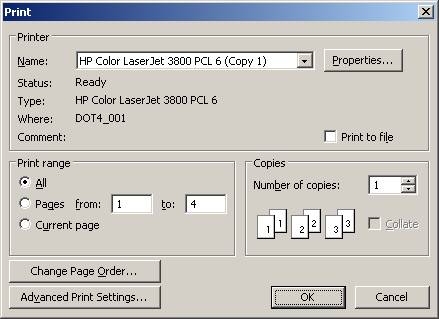
Click Advanced
Print Settings
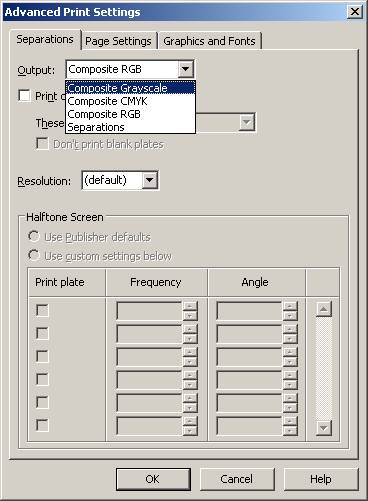
Change composite to Composite Grayscale
Click OK
Click PRINT on next window
- The
6 + 1 Traits of Writing will be assessed as part of your grade. As discussed
in class, you need to consider these traits and proofread your newsletter
before printing. As also discussed in class, it will be a good idea to have
a peer review your work. Click
here for that link.
|